
Instructions for setting up a program for sending Direct messages to Instagram users.
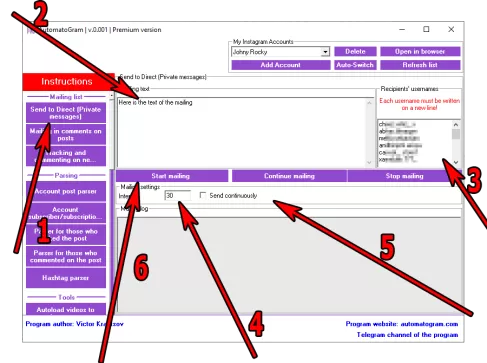 Instructions for setting up a program for sending Direct messages to Instagram users.
1) In the left menu of the program, select the section "Send to Direct" (item 1 in the screenshot)
2) Enter the text of the mailing by writing the desired phrase or several sentences in the "Mailing text" field (item 2 in the screenshot).
2.1) If you want to add Emoji to your message, use the "Text converter with Emoji" (Clickable)
3) Specify the list of recipients for your mailing list by entering them in the "Recipients' username" field (item 3 in the screenshot). Remember that the Username in the recipient list must be indicated on a new line.
4) Specify the sending interval in seconds by filling in the appropriate field (Item 4 in the screenshot). Remember that this is the interval between sendings to different users.
5) If you want the program to start over from the beginning after it has gone through the entire list, you can check the box "Send continuously" (Item 5 in the screenshot)
6) After you have filled in all the fields and indicated all the necessary information, click on the "Start mailing" button (item 6 in the screenshot)
After clicking the "Start Mailing" button, the program will open a browser, log in to the currently selected account, and begin opening private messages with Instagram users one by one and sending them messages by filling in the "Message" field in the chat. Under no circumstances should you use this open browser for any other actions, as this may disrupt the program's operation.
Partial results of sending messages will be displayed in the "Mailing Log"
Automatic Instagram direct messaging through a browser
This page provides a detailed description of the tool designed for semi automatic Instagram messages delivery. The module allows users to run a complete Instagram direct messaging workflow using a custom message, a list of usernames and flexible intervals. All actions are performed inside a simple browser based interface. The main purpose of the tool is to make direct message interaction predictable, convenient and fully controlled by the user.
Main tool capabilities
To start Instagram mailing the user sets up the message text and uploads a list of recipients. The list may be prepared manually or collected with other program modules. The next step is setting the interval between each message. Intervals help maintain a natural activity pattern and allow stable long term sending even when the number of recipients is high.
The program sends each message through a regular browser window. The user can see every action visually: opening recipient pages, switching to the message form, inserting text and confirming the sending. This approach makes the workflow look as natural as possible and helps avoid unexpected restrictions.
Flexible configuration
Users can alternate message variations, shuffle recipient lists and control the speed of sending. The module stores the delivery history and makes it possible to repeat or adjust the process at any moment. Full control over intervals, message content and sending order allows users to build a stable and predictable communication workflow.
These tools make it possible to gather targeted audiences and combine them with Instagram direct messaging for more precise communication.
Free demo version
Every user can download the demo version without registration. The demo includes access to the sending structure, interface and basic functions of the direct messaging tool. It starts working immediately after installation and does not require activation.
The module is designed for users who need maximum control, stable sending and a fully adjustable Instagram direct workflow. It makes message delivery easier, faster and more reliable compared to manual sending.
- Account subscribers/subscriptions parser
- Parser of those who licked the post
- Parser of those who comment on a post