
Instructions for setting up a program for sending Direct messages to Instagram users.
 Instructions for setting up a program for sending Direct messages to Instagram users.
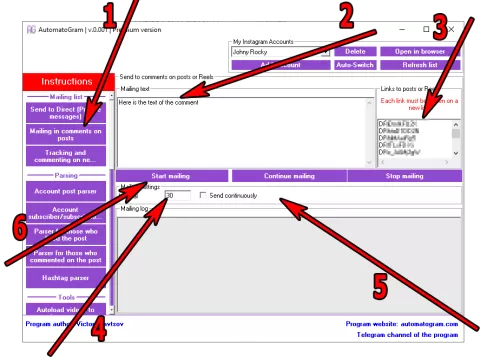
1) In the left menu of the program, select the section "Mailing in comments of posts" (item 1 in the screenshot)
2) Specify the text of the comment by writing the desired phrase or several sentences in the "Mailing text" field (item 2 in the screenshot).
2.1) If you want to add Emoji to your message, use the "Text converter with Emoji" (Clickable)
3) Enter a list of Instagram post links or codes in the "Links to posts or Reels" field. Remember, each link must be on a new line!
4) Specify the sending interval in seconds by filling in the appropriate field (Item 4 in the screenshot). Remember that this is the interval between sending comments under different posts.
5) If you want the program to start over from the beginning after it has gone through the entire list, you can check the box "Send continuously" (Item 5 in the screenshot)
6) After you have filled in all the fields and indicated all the necessary information, click on the "Start mailing" button (item 6 in the screenshot)
After clicking the "Start Mailing" button, the program will open a browser, log in to the account you currently selected, and begin opening the posts you specified one by one and sending comments by filling in the "Add a comment" field on the page. Under no circumstances should you use this open browser for any other actions, as this may disrupt the program's operation.
Partial results of sending comments will be displayed in the "Mailing Log"
Automatic Instagram comments posting through a browser
This page describes the tool designed for semi automatic posting of instagram comments. The module allows users to prepare a custom comment text, upload a list of target usernames and set intervals between actions. The tool opens each profile in a regular browser window and posts comments manually, just as a real user would do. This makes the workflow predictable, stable and fully controlled by the user.
How the comments tool works
To start, the user enters the comment text. Then a list of profiles is added. These can be collected manually or prepared earlier. Once the list is ready, the user selects an interval between each action. The tool opens every profile one by one, scrolls to the comment section, inserts the text and posts it. The entire sequence is visible, allowing the user to monitor all actions in real time.
Full control over the process
The user can control the order of profiles, the speed of posting, and the content of each comment. The module shows each step: opening the page, switching to the needed post, inserting the comment and submitting it. This approach helps maintain transparency and ensures accuracy of every action.
Benefits of working through a browser
Because instagram comments are posted directly through a regular browser, the behavior looks natural. The tool repeats real user actions step by step. This reduces technical issues and helps keep the workflow stable even when the list of profiles is large.
Flexible settings
The user may prepare several comment variations and alternate them if needed. It is also possible to split the task into separate parts. If the list is large, the user can run the module several times, continuing from the last completed profile. The tool saves progress, making the workflow easier to manage.
Status tracking and management
During work, the user sees which profile is being opened and which comment has already been posted. If adjustments are needed, the process can be stopped, settings can be changed and the posting can be restarted. Everything is designed to maintain full clarity and convenience.
Free demo version
The demo version can be downloaded without registration. It includes access to the interface structure and basic preview of how the comments tool operates. This helps the user understand the workflow before switching to the full version.
This module is designed for users who want a convenient and controlled way to post instagram comments through a browser. It offers custom comment text, flexible intervals, profile lists and visual control over the entire workflow. The tool makes the commenting process easier, more stable and more efficient.